Form
A multi-field form with configurable field types, validation, and email submission. Fields are stored as a typed object_list — each field has a field_type that maps to a sub-block schema.
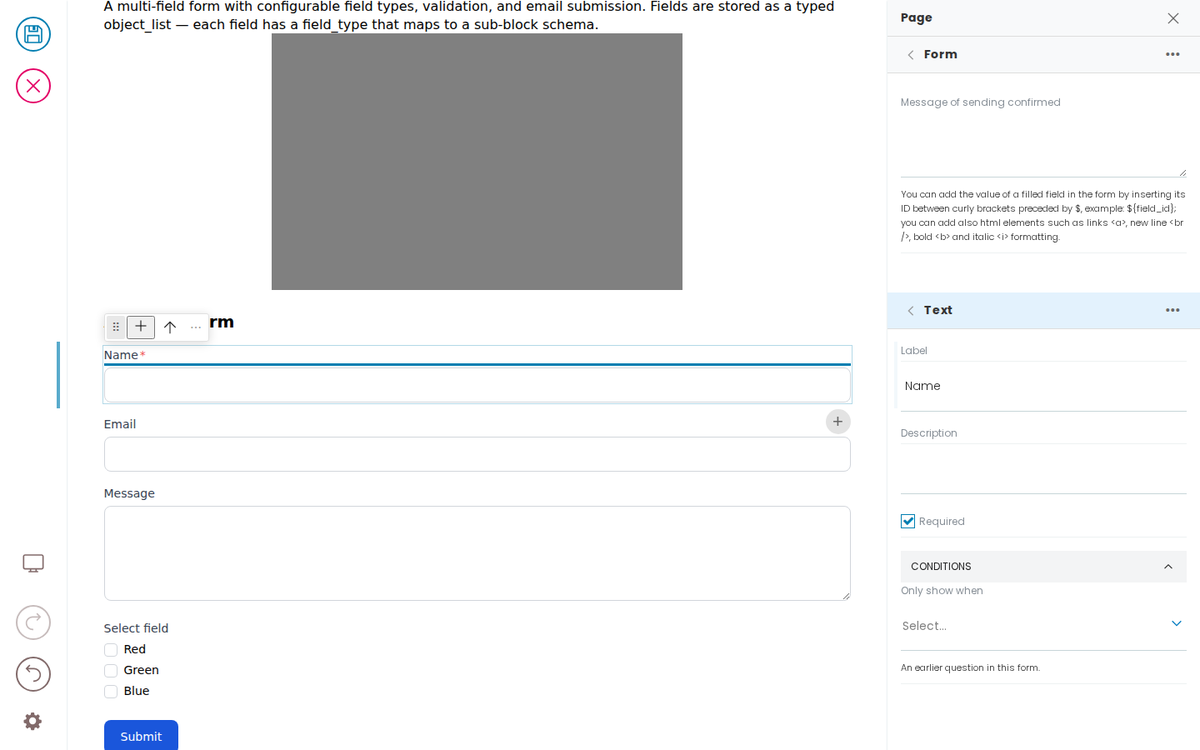
A simple form
Developer Reference
Schema
Pass this object inside the blocks option when calling initBridge() to register this block type with the admin UI. See Custom Blocks for the full setup guide.
    form: {
        id: 'form',
        title: 'Form',
        icon: formIcon,
        group: 'common',
        blockSchema: {
            fieldsets: [
                {
                    id: 'default',
                    title: 'Default',
                    fields: [
                        'title', 'description', 'subblocks',
                        'default_to', 'default_from', 'default_subject',
                        'submit_label', 'show_cancel', 'cancel_label',
                        'mail_header', 'mail_footer',
                        'captcha', 'email_otp_verification', 'sortOn', 'sortOnOptions', 'optionsFrom'],
                },
                {
                    id: 'manage_data',
                    title: 'Manage data',
                    fields: ['store', 'remove_data_after_days', 'send', 'send_message'],
                },
            ],
            properties: {
                // Three custom widgets, on a block whose schema this
                // fixture owns — the built-in search block's schema is Volto's,
                // so a widget declared there never reaches the sidebar.
                sortOn: {
                    title: 'Sort results by',
                    type: 'string',
                    widget: 'querystringSelect',
                    indexes: 'sortable',
                    emptyLabel: '— no sorting —',
                },
                sortOnOptions: {
                    title: 'Sort-by options',
                    type: 'array',
                    widget: 'querystringSelect',
                    indexes: 'sortable',
                    multiple: true,
                },
                optionsFrom: {
                    title: 'Options from',
                    type: 'string',
                    widget: 'vocabularySelect',
                },
                send_email: { title: 'Send email', type: 'boolean' },
                title: {
                    title: 'Title',
                    type: 'string',
                },
                description: { title: 'Description', type: 'string', widget: 'textarea' },
                subblocks: {
                    title: 'Fields',
                    widget: 'object_list',
                    idField: 'field_id',
                    typeField: 'field_type',
                    allowedBlocks: [
                        'text', 'textarea', 'number', 'select',
                        'single_choice', 'multiple_choice', 'checkbox',
                        'date', 'from', 'static_text', 'hidden', 'attachment',
                    ],
                },
                default_to: {
                    title: 'Recipients',
                    type: 'string',
                },
                default_from: {
                    title: 'Default sender',
                    type: 'string',
                },
                default_subject: {
                    title: 'Mail subject',
                    description: 'Use the ${field_id} syntax to add a form value to the email subject',
                    type: 'string',
                },
                submit_label: {
                    title: 'Submit button label',
                    type: 'string',
                },
                show_cancel: {
                    title: 'Show cancel button',
                    type: 'boolean',
                    default: false,
                },
                cancel_label: {
                    title: 'Cancel button label',
                    type: 'string',
                },
                mail_header: {
                    title: 'Text at the beginning of the email',
                    widget: 'richtext',
                    type: 'string',
                    description: "If field isn't filled in, a default text will be used",
                },
                mail_footer: {
                    title: 'Text at the end of the email',
                    widget: 'richtext',
                    type: 'string',
                    description: "If field isn't filled in, a default text will be used",
                },
                captcha: {
                    title: 'Captcha provider',
                    type: 'string',
                },
                email_otp_verification: {
                    title: 'Validate BCC emails with OTP verification',
                    description: "Prevent spam from your website. By enabling this option, you do not allow malicious users to send emails to other email addresses through your website. The OTP will be requested for all email-type fields for which the 'Send a copy of the email to this address' option is checked.",
                    type: 'boolean',
                    default: false,
                },
                store: {
                    title: 'Store compiled data',
                    type: 'boolean',
                },
                remove_data_after_days: {
                    title: 'Data wipe',
                    description: 'Number of days after which, the data should be deleted',
                    type: 'integer',
                    default: -1,
                },
                send: {
                    title: 'Send email to recipient',
                    description: 'Attached file will be sent via email, but not stored',
                    type: 'boolean',
                },
                send_message: {
                    title: 'Message of sending confirmed',
                    widget: 'textarea',
                    description: 'You can add the value of a filled field in the form by inserting its ID between curly brackets preceded by $, example: ${field_id}; you can add also html elements such as links <a>, new line <br />, bold <b> and italic <i> formatting.',
                },
            },
            required: ['default_to', 'default_from', 'default_subject', 'captcha'],
        },
        schemaEnhancer: {
            fieldRules: {
                // cancel_label only visible when show_cancel is checked
                cancel_label: { when: { show_cancel: true }, else: false },
            },
        },
    }
JSON Block Data
Example block JSON (as stored in the CMS). This is the data structure your component will receive in the block prop.
{
  "@type": "form",
  "default_from": "noreply@plone.org",
  "title": "A simple form",
  "default_to": "admin@example.com",
  "default_subject": "New form submission",
  "captcha": "honeypot",
  "lastChange": 1710238630312,
  "remove_data_after_days": -1,
  "send_email": true,
  "show_cancel": false,
  "store": true,
  "subblocks": [
    {
      "field_id": "1709833577467",
      "field_type": "text",
      "id": "1709833577467",
      "label": "Name",
      "required": true
    },
    {
      "field_id": "1709833592544",
      "field_type": "from",
      "id": "1709833592544",
      "label": "Email",
      "required": false,
      "use_as_bcc": false,
      "use_as_reply_to": false
    },
    {
      "field_id": "1709833604677",
      "field_type": "textarea",
      "id": "1709833604677",
      "label": "Message",
      "required": false
    },
    {
      "field_id": "1709833616406",
      "field_type": "multiple_choice",
      "id": "1709833616406",
      "input_values": [
        "Red",
        "Green",
        "Blue"
      ],
      "label": "Select field",
      "required": false
    }
  ]
}
Rendering
How this block renders in your frontend. Add its handling to your renderer, or — for list-style blocks — register a fetcher and reuse your list rendering.
function FormBlock({ block }) {
  const fields = expandTemplatesSync(block.subblocks || [], { idField: 'field_id' });

  return (
    <form data-block-uid={block['@uid']} className="form-block" onSubmit={e => e.preventDefault()}>
      <h3 data-edit-text="title">{block.title}</h3>
      {block.description && <p data-edit-text="description">{block.description}</p>}

      {fields.map(field => (
        <div key={field.field_id} data-block-uid={field.field_id} className="form-field">
          <FormField field={field} />
        </div>
      ))}

      <button type="submit" data-edit-text="submit_label">{block.submit_label || 'Submit'}</button>
    </form>
  );
}

function FormField({ field }) {
  const label = field.label || '';
  const required = field.required || false;

  switch (field.field_type) {
    case 'text':
      return <label><span data-edit-text="label">{label}</span> <input type="text" required={required} /></label>;
    case 'textarea':
      return <label><span data-edit-text="label">{label}</span> <textarea required={required} /></label>;
    case 'number':
      return <label><span data-edit-text="label">{label}</span> <input type="number" required={required} /></label>;
    case 'from':
      return <label><span data-edit-text="label">{label}</span> <input type="email" required={required} /></label>;
    case 'date':
      return <label><span data-edit-text="label">{label}</span> <input type="date" required={required} /></label>;
    case 'checkbox':
      return <label><input type="checkbox" required={required} /> <span data-edit-text="label">{label}</span></label>;
    case 'select':
      return (
        <label><span data-edit-text="label">{label}</span>
          <select required={required}>
            <option value="">Choose...</option>
            {(field.input_values || []).map(v => <option key={v} value={v}>{v}</option>)}
          </select>
        </label>
      );
    case 'single_choice':
      return (
        <fieldset>
          <legend data-edit-text="label">{label}</legend>
          {(field.input_values || []).map(v => (
            <label key={v}><input type="radio" name={field.field_id} value={v} /> {v}</label>
          ))}
        </fieldset>
      );
    case 'multiple_choice':
      return (
        <fieldset>
          <legend data-edit-text="label">{label}</legend>
          {(field.input_values || []).map(v => (
            <label key={v}><input type="checkbox" value={v} /> {v}</label>
          ))}
        </fieldset>
      );
    case 'static_text':
      return <p data-edit-text="label">{label}</p>;
    case 'hidden':
      return <input type="hidden" name={field.field_id} value={field.value || ''} />;
    case 'attachment':
      return <label><span data-edit-text="label">{label}</span> <input type="file" required={required} /></label>;
    default:
      return <label><span data-edit-text="label">{label}</span> <input type="text" /></label>;
  }
}