Teaser
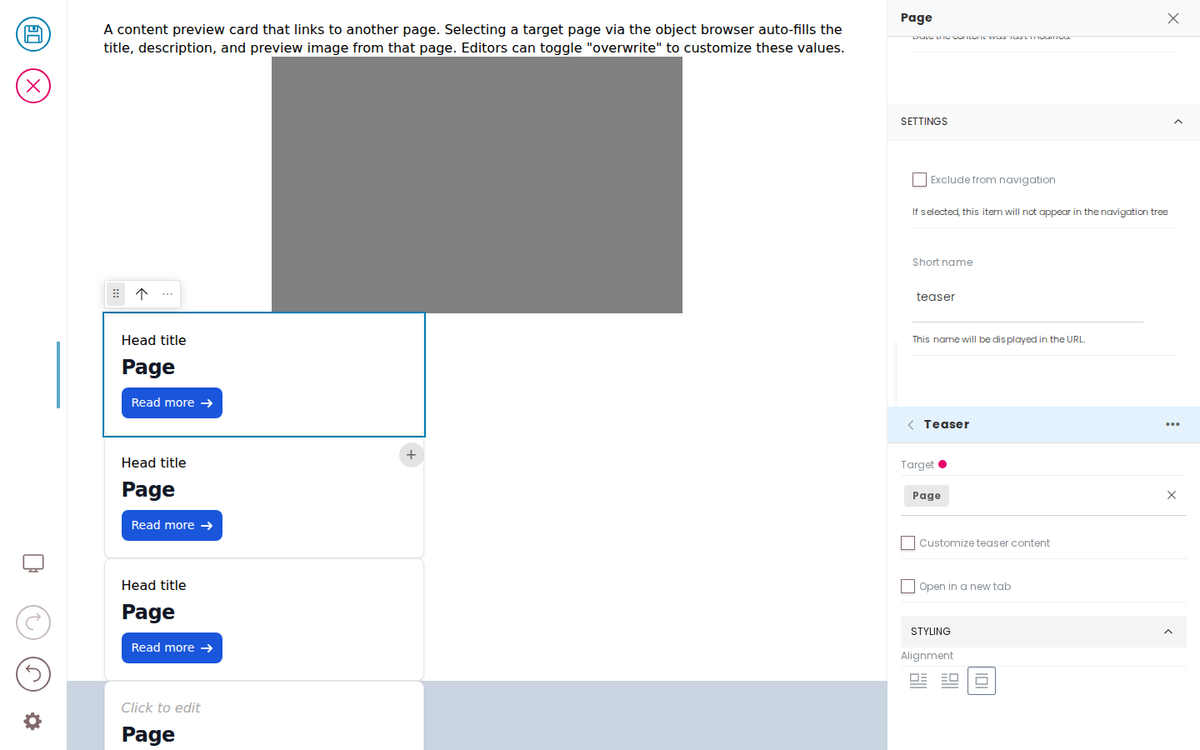
A content preview card that links to another page. Selecting a target page via the object browser auto-fills the title, description, and preview image from that page. Editors can toggle "overwrite" to customize these values.
Developer Reference
Schema
Pass this object inside the blocks option when calling initBridge() to register this block type with the admin UI. See Custom Blocks for the full setup guide.
    teaser: {
        id: 'teaser',
        // A listing renders each result as this type, so it must declare how a
        // result's fields land on it — that mapping is also what makes it
        // selectable in the Item Type widget (filterConvertibleFrom: '@default').
        // A frontend's fieldMappings REPLACE the admin's (mergeFrontendBlock),
        // so the admin's conversion from an image is listed here too.
        fieldMappings: {
            '@default': { '@id': 'href', 'title': 'title', 'description': 'description', 'image': 'preview_image' },
            image: { 'href': 'href', 'alt': 'title', 'url': 'preview_image' },
        },
        title: 'Teaser',
        icon: teaserIcon,
        group: 'common',
        // Mirrors Volto's own teaser schema (core Teaser/schema.js) IN FULL,
        // because a frontend's blockSchema replaces the admin's (nothing of
        // Volto's is merged in). A PARTIAL copy is what
        // broke the starter UI: declaring title/description without `overwrite`
        // — the "customize" checkbox those fields hang off — left the bridge
        // with a teaser whose link and toggle did not exist.
        blockSchema: {
            fieldsets: [
                { id: 'default', title: 'Default', fields: ['href', 'overwrite', 'title', 'head_title', 'description', 'preview_image', 'openLinkInNewTab'] },
                { id: 'styling', title: 'Styling', fields: ['styles'] },
            ],
            properties: {
                href: { title: 'Target', widget: 'object_browser', mode: 'link', allowExternals: true, selectedItemAttrs: ['Title', 'head_title', 'Description', 'hasPreviewImage', 'image_field', 'image_scales', '@type'] },
                overwrite: { title: 'Customize teaser content', type: 'boolean', default: false },
                title: { title: 'Title' },
                head_title: { title: 'Kicker' },
                description: { title: 'Description', widget: 'textarea' },
                preview_image: { title: 'Image override', widget: 'object_browser', mode: 'image', allowExternals: true, selectedItemAttrs: ['image_field', 'image_scales'] },
                openLinkInNewTab: { title: 'Open in a new tab', type: 'boolean' },
                styles: {
                    widget: 'object',
                    title: 'Styling',
                    schema: {
                        fieldsets: [{ id: 'default', title: 'Default', fields: ['align'] }],
                        properties: {
                            align: { widget: 'align', title: 'Alignment', actions: ['left', 'right', 'center'], default: 'left' },
                        },
                        required: [],
                    },
                },
            },
            required: ['href'],
        },
        // The teaser's RULE, not a snapshot of one side of it. A teaser MIRRORS
        // its target by default — title/description/image belong to the page it
        // points at and are not this block's to edit — until "Customize teaser
        // content" is ticked, when they become its own.
        //
        // Volto expresses that as a schema FUNCTION of the data, which cannot
        // reach a frontend: the block config crosses postMessage, so functions
        // don't survive. fieldRules is the declarative form of the same rule and
        // travels intact, so the admin and the mock parent resolve the teaser
        // identically — instead of one of them believing the title is always
        // editable and the other that it has no fields at all.
        schemaEnhancer: {
            fieldRules: {
                title: { when: { overwrite: true }, else: false },
                head_title: { when: { overwrite: true }, else: false },
                description: { when: { overwrite: true }, else: false },
                preview_image: { when: { overwrite: true }, else: false },
            },
        },
    }
JSON Block Data
Example block JSON (as stored in the CMS). This is the data structure your component will receive in the block prop.
{
  "@type": "teaser",
  "title": "Headline H2",
  "head_title": "Head title",
  "href": [
    {
      "@id": "/docs/examples/content-types/page"
    }
  ],
  "description": "Lorem ipsum dolor sit amet, consetetur sadipscing elitr, sed diam nonumy eirmod tempor invidunt ut labore et dolore magna aliquyam erat, sed diam voluptua. At vero eos et accusam et justo duo dolores et ea rebum.",
  "styles": {
    "align": "center"
  }
}
Rendering
How this block renders in your frontend. Add its handling to your renderer, or — for list-style blocks — register a fetcher and reuse your list rendering.
import { getImageUrl } from './utils.js';

function TeaserBlock({ block }) {
  const hrefObj = block.href?.[0] || null;
  const useBlockData = block.overwrite || !hrefObj?.title;

  const title = useBlockData ? block.title : hrefObj?.title || '';
  const description = useBlockData ? block.description : hrefObj?.description || '';
  // Strip API origin from brain @id so the link resolves same-origin.
  const href = contentPath(hrefObj?.['@id'] || '');
  const imageSrc = block.preview_image
    ? getImageUrl(block.preview_image)
    : (hrefObj?.hasPreviewImage ? getImageUrl({ '@id': `${href}/@@images/preview_image` }) : '');

  if (!href) {
    return (
      <div data-block-uid={block['@uid']} className="teaser-placeholder">
        <p>Select a target page for this teaser</p>
      </div>
    );
  }

  return (
    <div data-block-uid={block['@uid']} className="teaser-block">
      {imageSrc && <img data-edit-media="preview_image" src={imageSrc} alt="" />}
      <h3 data-edit-text="title">{title}</h3>
      <p data-edit-text="description">{description}</p>
      <a href={href} data-edit-link="href">Read more</a>
    </div>
  );
}